Monday, December 16, 2013

How to Display the Windows Defender on the Windows 8 Notification Area

Windows Defender is a Microsoft anti-virus built-in Windows 8. By default this light weight AV is enabled. It is running on the background although you are not going to see it on the notification area (or sometimes called system tray) and on the context menu. The context menu is the menu that pops up when you right click on a file. 

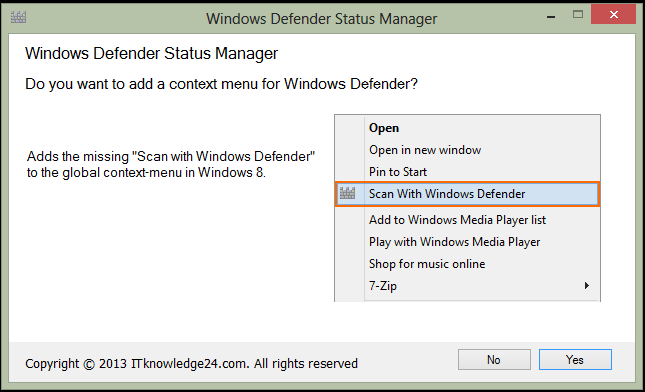
If you want to show it on the notification area and on the context menu you are going to need an application called Windows Defender Status Manager. You can find this small and free application at http://www.itknowledge24.com. During the installation you have to click the Yes button when you are ask to add a context menu. See the screen shot below.


There is one minor issue with the WDSM. After it is successfully installed you will notice a red "X" on it which conveys that it is disabled. To fix this issue, you have to open the WDSM settings by right clicking it. Go the Settings tab toggle off and on the real time protection. Do not forget to save each time otherwise you will not see the result. See these screen shots below to give you an idea.


There is another issue with WDSM which I find quite awkward. It does not show up on the context menu if you right click on a folder or a group of more than fifteen files. To scan a folder you may do a custom scan on the WD. In the case of more than fifteen files you may either scan it by group or scan its folder.

Having said all these issues about WD and WDSM both are worth using. Windows Defender Status Manager is patching up of what is missing with Windows Defender. Despite of being a light weight AV, Windows Defender is effective because it prevents and removes most of the viruses. Moreover, it does not slow down the computer.

Christmas is just around the corner so I want to greet all my readers a merry and meaningful Christmas. God bless everyone.


Friday, November 1, 2013

North Korea's Red Star Operating System

When I learned that North Korea developed their own operating system called "Red Star" I started to become curious about it. I tried to look for some sources where I can get a copy luckily I found one website which I think the only website that has. Some people say that there are also some sources on the torrent sites.

According to www.wikipedia.com, the development of Red Star started way back in 2002 and in 2010 it is already on version 2.0. We rarely hear any news from that country except when they have confrontation with the South or the US. Their isolation makes the people more curious about what is going on in there. Anyway, Red Star is North Korea's version of Linux.

I find it difficult to install because everything is written in Korean language. I tried looking for an English version but no success. Despite of it I am still able to successfully install it on my Virtual Box machine with the help of a little intuition. Here below you will find some screen shots during the installation and afterwards the desktop.

The welcoming screen and the rest of the installation procedures.


Wednesday, October 9, 2013

Beware of a Ransomware called Cryptolocker


Beware of a ransomware called Cryptolocker. Nowadays, the malwares are becoming more destructive and more sophisticated compared in the previous years. The authors of these malwares have gone too extreme to the point that they are demanding a ransom money from their victims if they want to get their files back.

Early this afternoon, the laptop of one of our managers got infected by the Cryptolocker. Apparently, the malware is able to evade his anti-virus. It is already too late when it is detected because all his files are already encrypted by this destructive malware. Thus, he cannot open his files. As you can see on the screenshot that after a given time he will not be able to get his files anymore. If you go on further the author of this malware is extorting a money amounting to $300 to decrypt the files so he can have his files back. If you have many important files on your computer as he is you may probably give in to the author's demand.

Until now he does not know where he got the malware or he is probably just playing innocent that he did not download anything. As I make a research on the internet about this malware the victims got it from the email. They received emails with these subjects "USPS Tracking, Dunn & Bradstreet rating or similar subjects" with a .zip or .rar attachment.

As of this writing there is no way to decrypt the files although the malware may be removed from the computer. The best way to defend ourselves from such desctructive malwares next to having a reliable anti-virus is to use a sound judgement. If we get an email from an unknown source do not open the attachment or click the link. The people spreading these malwares are luring their victims by using too good to be true email subjects. Be cautious if you receive suspicious emails such as these subjects "For instant access, Cashcashcash and Potential earnings" aside from the subjects mentioned above.


Wednesday, September 4, 2013

How to Hide the Keywords from the Firewall


Would you like to hide from the firewall the keywords that you are searching on Google?

If you want to have some sort of privacy whenever you are searching on the internet while you are behind the company firewall. You can use the encrypted Google search by simply typing on your browser https://encrypted.google.com instead of the usual http://google.com.

As you can see on the two screen shots above. I searched for "ruby on rails developer jobs" on Google. On the DOS window shows the IP address of my computer which is 192.168.1.62. However, if you are going to take a look on the screen shot of the Cyberoam firewall log you will not see there the keywords that I typed on Google neither my IP address.

Did you notice the time? Take a closer look at the time I started searching on Google you will see there 03:51 pm. Now take a closer look on the firewall log. At the top most the time that appears on the log are 15:52 and 15:47. The firewall did not record my search that took placed at 15:51 or 03:51 pm in a 12-hour format.

This simple tip will only help you hide the keywords that you are searching on Google. If you open a website that will be recorded on the firewall log.

Friday, August 16, 2013

HeidiSQL


I was looking for a lightweight and easy to use application that I can use to manage MySQL database while I was working on some Ruby On Rails codes. Until I found HeidiSQL that match exactly what I want. I have just started using it and I must say that as you explore its features you tend to like it more.

HeidiSQL is an opensource application that can be used to manage MySQL and MS SQL. In order to manage the database the user with authenticity must login locally or remotely. And once you are inside you can browse, edit data, create and edit tables, view, export structure and data to SQL file and a lot more.

To give you an idea of what HeidiSQL has to offer here is a list of its features:
  • Connect to multiple servers in one window
  • Connect to servers via commandline
  • Connect via SSH tunnel, or pass SSL settings
  • Create and edit tables, views, stored routines, triggers and scheduled events.
  • Generate nice SQL-exports
  • Export from one server/database directly to another server/database
  • Manage user-privileges
  • Import text-files
  • Export table rows as CSV, HTML, XML, SQL, LaTeX, Wiki Markup and PHP Array
  • Browse and edit table-data using a comfortable grid
  • Bulk edit tables (move to db, change engine, collation etc.)
  • Batch-insert ascii or binary files into tables
  • Write queries with customizable syntax-highlighting and code-completion
  • Pretty reformat disordered SQL
  • Monitor and kill client-processes
  • Find specific text in all tables of all databases of one server
  • Optimize and repair tables in a batch manner
  • Launch a parallel mysql.exe command line window using your current connection settings

Tuesday, July 9, 2013

How to Archive Emails in Outlook 2010

From time to time some of our co-employees are calling us up that their mailbox is already full, thus they are not receiving emails anymore. What we usually do is to archive their emails to free up some space on their mailbox so it can accommodate the incoming emails. Archiving is moving the emails from the mail server onto another folder or drive. You need to be sure that the new folder or drive is safe enough otherwise you might lose your important emails. It is a good idea to keep a backup of the archived emails just in case if something goes wrong with your computer you can retrieve it at anytime.

On the picture above my mailbox has not yet reached the full level but for the sake of demonstration I had to archive it.

Here's how to archive emails in Outlook 2010:
  1. Click the "File" tab
  2. Click the "Cleanup Tools"
  3. Click "Archive..."
  4. Click the "Archive this folder and all subfolders"
  5. Specify the date on "Archive items older than". This will archive the emails starting from the date you specify here backward.
  6. Under the "Archive File", you may change the default archive file name or leave it as it is. 
  7. You may optionally save the archive file on another location or leave it as it is. You have to be sure that you have enough space on the drive you specified for the archive file.
  8. You may optionally put a tick mark on "Include items with Do not AutoArchive checked" or leave it as it is. If you put a tick mark on this option it will include any items that might be individually marked to be excluded from automatic archiving.
  9. Finally, click "Ok"
This process may take some time depending on the number of emails that you are archiving.

When you go back to your emails you will notice at the bottom the "Archive" you have just created wherein you will also see the folders created identical to that of your current email. If you want to see where your archive file is saved you may do so by going to the "Account settings" and clicking the "Data Files" tab.

Tuesday, June 4, 2013

Disk Partition Software

As I was browsing the internet I stumbled upon this interesting software called AOMEI Partition Assistant. It is an all-in-one disk partition software that makes the partitioning a little bit easier than the usual and with many added features. It has a version for home users and for windows servers. The home users can use this on Windows XP, Vista, 7 and 8. For Windows Servers it support Windows Server 2000, 2003, 2008, 2011 and 2012. Partition Assistant Standard and Partition Assistant Lite are free for private and commercial environment but with limited features compared to the paid edition.

Some of its partitioning features are already available on windows they just made it a little bit easier on a nicer graphical user interface. You will find its features and tutorial on http://www.disk-partition.com/manual.html?pahome-install.

Friday, May 3, 2013

Two Popular Text Editors


Notepad++ and Sublime Text are the text editors that I really find useful and easy to use. Both has their own special features and support many scripting languages. As you can see on the screen shots above the screen is neat and highlighted depending on the language you preferred. This way it is easier to read the codes especially if you follow the indention. They also have the features that after choosing the default language you can just click on the save button and it will save the file with an extension name for that particular language. Moreover, the source codes load almost instantly.

I find it hard comparing these two text editors because both of them has a lot of special features some of which do not exist on the other. However, there are only two differences that I would like to highlight on this post. Notepad++ is free and Sublime Text is not. Sublime text has a special feature of "auto completion" wherein upon typing the first character it can already sense of what you are about to type and it will give you some suggestions. This may vary depending on the language you setup while Notepad++ does not have that feature.

If you have a text editor that you feel more comfortable to use and offers many features then that can help you accomplish your task much earlier.

Tuesday, April 2, 2013

Small and Portable Web Server for Classic ASP

I am testing a web page done on classic ASP. Although I have installed the IIS on my computer but I am still looking for a light weight preferably portable web server until I found Baby Web Server. It works just fine while testing the website on my local drive. The installer is only around 90 kb as of this writing...pretty small eh.

Setting it up is very easy. Simply locate the folder where you saved the web pages. Type the default asp page. Click the "Start" button. Presto! You have a running web server in a matter of seconds.

I am assuming that you have already done the web pages otherwise you have to create a sample page for testing purposes like the infamous Hello World. To test the Baby Web Server just type http://localhost/default.asp on your browser where "default.asp" as the home page. If the web page shows up that means that you have set up Baby Web Server correctly.

Friday, March 1, 2013

Start Button for Windows 8

Windows 8 is out in the market for quite some time already. It has many significant changes than its predecessor Windows 7. One of the significant changes is the removal of the "Start" button which is replaced by the "Metro Start Screen". The Start button that we have been using for the past two decades is already gone. However, there are some third party software that came out to resurrect the most wanted "Start" button. Here they are:
  1. Classic Shell (free)
  2. Pokki (free)
  3. Start8 (this is not free)
 This is how the Windows 8 desktop looks like without the start button.


This is how the Windows 8 desktop looks like with the "Classic Shell" start button.


This is how the Windows 8 desktop looks like with the "Pokki" start button.


This is how the Windows 8 desktop looks like with the Windows start button as part of the customization feature of "Pokki".


On the pictures above you will see there the "Classic Shell" and the "Pokki" start buttons. I have tried both but I prefer more "Pokki" than "Classic Shell" because it blends well with the Windows 8 graphical user interface. As you can see on one of the pictures above I even changed the "Pokki" start button with the Windows start button. When I am using "Classic Shell" it seems like I am still using Windows 7. I do not feel the Windows 8 environment.

Wednesday, February 13, 2013

The Liebster Award


One of my friends in bloggers.com, Diane, nominated my blog for the Liebster Award in which I am very grateful. In order to qualify for this award we have to follow the rules.

Here's the rules
1. Each person must list 11 things about themselves.
2. Answer the 11 questions that the tagger has set for you PLUS you must create 11 questions of your own for the 11 people you will nominate with this award.
3. Choose up to 11 bloggers linking them to your post.
4. Go to their page and inform them of the nomination
5. Absolutely NO tags back. Remember to ONLY tag bloggers with less than 200 followers.

Friday, February 1, 2013

Free WYSIWYG HTML Editor


There are variety of html text editors to choose from if you are planning of developing a website.Starting with the very basic Notepad (which comes with Windows) to the most sophisticated commercial WYSIWYG html editors like Dreamweaver. When you are looking for a WYSIWYG html editor you might already have come across with Kompozer.

Kompozer is an opensource Web Authoring System combining web file management and WYSIWYG html editor. It is designed to be as user friendly as possible specifically for those who do not have a knowledge on html codes. Just like the popular WYSIWYG html editors it has the split viewing of source code and design so you can switch the viewing to see the outcome while on design time. Creating stylesheets is also easy. The beginners will not have a hard time to learn it. When you are ready to upload your website you do not have leave Kompozer anymore to open a FTP client software. It has a built-in FTP site manager to help you upload your website. If you are a Windows, Linux or Mac user you do not have to worry about compatibility issue because this software will run on any platform.

These are just some of the basic features of Kompozer.If you want to find out more about it you will find it at http://kompozer.net

Tuesday, January 1, 2013

A Reliable Backup Software


There are dozens of free backup software that you can find out there but I guess Cobian Backup stands out from the rest. It is not because it is free but in terms of reliability and functionality. As of this writing the latest version is Version 11 (a.k.a. Gravity). This version is compatible with Windows XP, Windows 7, Windows Servers 2003 and 2008. Whether 32 or 64 bit there is no issue about that.

Usually for the free edition you will find only the basic functionality of a backup software. However, on the case of Cobian Backup you will find almost all the features available only on the full version of commercial backup softwares. Unattended backup through its scheduler, encryption, compression, accessibility to backup from local or network drive and different types of backup (i.e. full, differential, incremental and dummy) to name a few of its features.

I have tried before the version 9 (a.k.a as Amanita) and currently I am using the latest version which is called Gravity. Since then and until now Cobian Backup never disappointed me and always meet my expectations. You can have a sound sleep and you can leave the backing up all by itself through the scheduler feature. Moreover, user interface is neat and simple. As a matter of fact you can set it up in no time because you can easily get familiar with the setting.

Two thumbs up for Cobian Backup.

I wish everyone a happy, peaceful and prosperous New Year.

Friday, December 14, 2012

How to Shift to Full Screen the DOS Command in Windows 7


A friend of mine asked me that the DOS command prompt window is cut off on her computer. Thus, the other information is not shown on the screen. I am sure that most of my readers have already tried using Windows XP. If you are using Windows 7 you will notice that the DOS command does not support the full screen unlike in Windows XP. In Windows XP you just have to press ALT + Enter to see the full screen. Actually, there is a workaround for that if you need to see the full screen. Here below is the simple instruction on how to shift to full screen in Windows 7:
  1. Click the Windows logo and right click on the DOS command
  2. Click "Run as Administrator"
  3. On the command prompt type "wmic"
  4. You will notice that the command prompt has changed. Click the Maximize on the top right corner of the DOS command window.
  5. The DOS command window will turn into full screen. Type exit but do not close the DOS command window.
  6. You will notice that you went back to the C: prompt. Now you can start typing a DOS command and see the result in full screen.
Alternatively, you may also try this:


  1. Click the Windows logo and right click on the DOS command
  2. Click "Properties"
  3. Click the "Layout" tab
  4. Adjust the Window size
  5. Click OK 
 Christmas is in the air! Wishing you all the joy, hope and wonder of the season.

Thursday, December 6, 2012

Action Voip Stopped Responding


Some of you might not have heard yet the Action Voip. Action Voip is a small program that makes it possible for the people to make a cheaper call on the internet. By spending a small amount you can make a cheaper call to any country. In countries where there is a big population of expatriates like the middle east a software such as this one is very popular.

One of the managers in the company where I am currently employed called my attention about the Action Voip issue on his laptop. While dialing it stop responding, thus he cannot make a call. I tried uninstalling and re-installing it but it did not help. I also tried other possible solutions like downloading the latest version but it did not help either.

The possible reason why it stop responding can be attributed to the windows update for Windows 7 that may not be fully compatible with Action Voip. However, there is a workaround for this call issue.

Here's how I did it:
  1. Right click on the Action Voip shortcut
  2. Click the Compatibility tab
  3. Put a tick mark on "Run this program in compatibility mode for"
  4. On the combo box select "Windows XP (Service Pack 3)"
  5. Finally, click Apply and OK buttons
That's it.I hope my fellow expatriates will find this post useful.

Friday, November 2, 2012

How to Turn Off Outlook Sync Log


Some of our co-employees have been complaining about this Outlook Sync Log. It is not only annoying to see your Sync folder being bombarded with logs but also occupies space on the mail box.  I also found out that a lot of people out there on the internet have also been complaining about this. I tried a few of their suggestions but none of them work. After spending hours searching on how to kill this pesky Sync Log I finally hit it. 

Try this :
  1.  Click on Tools
  2. Account Settings
  3. Under the Email tab double click the email address
  4. Click More Settings
  5. Click Advanced Tab
  6. Un-check “Use Cache Exchange Mode”
  7. Re-start Outlook

Thursday, September 6, 2012

How to Recover Your Files from a Dead Hard Disk


When you turned on your computer all you see is black screen with this error message: “Reboot and Select proper boot device or Insert Boot Media and press a key”. You probably tried to turn off and on your computer but the error message is still there. You might have also tried to shake your computer a little bit, but that will not work either.

In situations like this you may try to open the BIOS setting and see if your hard disk is detectable. If it is not then open your computer and check all the cables (e.g. SATA/IDE and power) if properly connected. You may also try to install that hard disk to another computer just to see if it will be detected. If you tried that and the error is not going away. You can now say good bye to your hard disk. If you do not have a backup of your files then that makes the situation even worse. Well, actually there is slim chance of getting your files back. But there is no assurance that it will work or if it does work you will be able to get all your files. First, you have to look for a hard disk which has “the same specification” with that of the defective unit. If you have a used hard disk of the same specification you may try that, what is important is the board of that hard disk is still okay.

Before we proceed I would like to show you the dead hard disk connected to a computer.  You will see on the BIOS setting that there is no hard disk detected on the 3rd drive. I also tried removing the first hard disk and installed only the second hard disk which is the defective one but it did not help either.

Wednesday, August 8, 2012

A Stable and Light Weight Email Server for Windows Platform


Software companies specializing in email servers are always coming up with something new to stay on top and beat their competitors. Thus, making their email server to eat up more resources of the server because of so many features. With these bundled features it also makes the installation and setup more difficult that usually require an advanced knowledge. Moreover, the price of the license also goes up as they add more features.

Despite of the tough competition among email servers emerge hMail Server. hMail Server is a free email server for windows platform, just like the popular email servers it supports the standard protocols POP3, SMTP and IMAP. Thus, there will be no issue with regards to setting up of email client software. The installation procedure is straight forward, you don't have to be an email server guru to make this software up and running. The latest version of hMail server as of this writing is "hMailServer 5.3.3-B1879".  You might be needing Windows Installer 3.1 and Microsoft .NET Framework Version 2.0 to install hMail server. If you encounter any issue you can find help from the online documentation or from the very active hMail community. 

Since hMail server is designed for windows platform, it can be integrated with Active Directory. All you have to do is put a tick mark to accomplish this. Another great feature of this software is it supports the popular SQL databases - Microsoft SQL, MySQL and Postgre SQL.
 
Even though this is a free software it has its own way of security. hMail server can be integrated with the open source anti-virus called ClamWin or any external anti-virus you prefer to use. Another great feature of this software is it has anti-spam protection. By just putting a tick mark you can enable the anti-spam from SpamAssassin. There are also these features of DNS black list, white listing, SPF, and a lot more.

If you're looking for a stable and light weight email server with the basic functionality of an email server hMail server is worth to try.  If you want to find out more, you can visit www.hmailserver.com.

Tuesday, July 3, 2012

Effective Anti-Malware

 
Spybot Search & Destroy (or Spybot S&D for short) is one of the most effective anti-malwares as of to date. I have tested this software for the past several years and I would say that it never let my computer down whenever a malware is underway. It detects a lot of malwares and is capable of removing it. Another great feature of this software is you can immunize your browser as a preventive measure against spywares.

Recently, the beta version of Spybot S&D is released with a new look. On this version they've already fixed some trivial and minor issues. As this is in beta stage, you are reminded that it should not replace the stable version. If you want to try Spybot S&D and see for yourself what it is capable of you can find it at http://www.safer-networking.org/en/home/index.html .

Monday, June 4, 2012

Print Spooler Error


Perhaps one of you might have already encountered the “spooler error”.  If you open the Printers and Faxes you won’t see any printer there.  It’s all white as if there is no printer installed. And, if you will try to re-install the printer driver the same thing happens. Usually that printer error occurs due to the installation of a third party software or corrupt printer drivers.

You’ll find some workaround on the internet for the “spooler error” however the most effective one is through the use of Microsoft Fix It.  Recently, one of our staff has encountered this error. And, luckily MS provided that app to fix it.  I was able to solve the printer issue in no time. Thanks to MS.